Sunday, December 8, 2013

How To Increase Twitter Followers Instantly?


Steps to Increase Your Twitter Followers

Below are some very easy steps that you have to follow to gain really targeted followers for your blog instantly.
  1. Make a list of some big blogs under your niche that have a huge list of twitter followers.

  2. Open their twitter page.

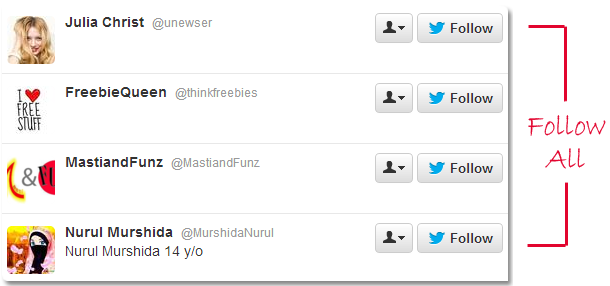
  3. Now check their followers. Below screenshot shows the twitter followers of a very popular blog    

    Click on FOLLOWERS link and follow their followers as many as possible.

    1. These are those people who have interest in your niche. Follow maximum people to gain maximum followers. There is really a cool formula on twitter that “You Follow Me, I Follow You Back!“. When we follow others, the majority of people follow us back on twitter.

    2. That’s it!

    These were very simple steps to increase targeted followers on twitter.
  4. Don’t Miss: How to Auto Tweet Blog Posts on Twitter?
But there is a problem.
The chances are also high that people don’t follow us back. So, we have to unfollow those people who are not following us back. It’s because our followers should look naturally increased. If we don’t remove the people who are not reciprocal with us, then anyone will get to know about our trick by doing a simple comparison between the number of people we are following and the number of our followers.

Friday, December 6, 2013

Google Plus Tips And Tricks


1.Introduce yourself


 Update your profile


Profile is where people can find out the newest about you. Select a profile photo that allows friends identify you, then add a some information that explain who you are.Use circles to choose who recognizes what. 
      • Select a cover photo 

A cover photo makes a great first impact when people visit your information. So choose wonderful photo that records how you are or informs you. 
      • Include your school and work 


Include some primary details to your details to help your friends discover you by. Where have you worked,lived and schooling.Search Google+ for friends who belong to same place.
        • Manage your privacy settings 

Google+ allows you handle who you listen to from. Check out Settings page to select who can tag you in images,posts, and deliver you notifications. You can also select who can talk with you through the “Privacy settings”.

2. Connect with family and friends


Add family and friends to see what they are sharing and discuss a few things back. Search your email to identify friends you know on Google+ Or discover friends from your school and work to exchange experiences. 
      • Google+ Circles

Circles make it easy to discuss the right factors with the right individuals.Share things with friends and family. Google+ circles are simply sharing across all of Google.

3. Follow interesting people 


Some of the innovative and motivating ideas are on Google+, publishing their newest ideas, videos, and images. Add your favorite Celebrities,sportsmen and musicians to see what they are saying right now. With Google+ we can automatically save every hangout on air to our youtube  account and share it to the world.
      • Start a hangout

Begin a hangout and invite individuals or Google+ circles to be a part of you. Then name your hangout.
      • Enable Hangouts On Air 

Check out “Enable Hangouts On Air”. Once you do this, you will need to accept the Terms of Service and also link your YouTube account. 

4.Share like 


Circles are an simple way to arrange the people you know They allow you to choose who you want to share with. Google+ provide you a few circles to share with friends,family and relatives. Decide who suits in each, and create new circles for even more.

Join the conversation 


When you find out a post that passions you show your admiration. +1 is a fast way to say “that’s pretty cool.” Add some comment if you want to say more, or reshare the post with your friends. 
 

  5.Say Hi 


Google+ is about great interactions. When you find an exciting post, display your gratitude by including a +1 or comment.Share something new like photo,videos,link, or whatever else is on your thoughts.


      • Discover people you know


Connect e-mail account to discover everyone in your contacts who already using Google+. Discover your loved friends add your school,college, or work to discover people who were there with you. If you are looking for someone in particular, you can search for them by name.

Create a Google+ Page For business


To make a Google+ page, you first need to have a profile on Google+. You can sign in using your Google account. If you do not have Google account creates one which is very simple and fast to join. Creating a Google+ page delivers you nearer to your customers, followers and fans on Google+. For creating page just choose a category related to your business where we have different groups like local business or place, product or brand, company, organization, arts, entertainment, sports, others etc., .Google+ enables you to explore how your followers interactions on your page impact your product and your business. Google+ pages are a way to use Google+ for your business

Thursday, December 5, 2013

5 Surefire Benefits of Updating Your Blog Regularly


5 Reasons Why Blogging Daily is Important

Daily blogging means working daily for blog to update it regularly with unique and original content that attract readers. Below are major benefits of blogging daily as compare to rarely updated blogs.

1# Search Engine Ranking

When we update our blog on daily basis, it starts gaining trust of search engines. And this is the most important factor to gain higher ranking in search results.
Search engines loves daily updated blogs and shows their content high in search results. So, always focus to update your blog as frequent as possible.

2# Improve Indexing Rate

Many times my readers ask me the solution to improve their blog’s indexing rate. They told me that their articles are not getting index in search engines even after several days.
The main reason behind this is only the frequency at which they update their blog. If we daily publish articles on our blog then search crawlers will visit our blog regularly to crawl and index our latest content. Through which we can get higher indexing rate for our blog. :)
Improve your blog’s indexing rate by submitting your blog sitemap to Google, Bing and Yahoo.

3# Build Solid Readership

Readers always like to read blog regularly they love the most. They visit those blogs in the hope to get newly published content written for them by the blog owner.
If we publish interesting content on our blog regularly then we can easily increase our readership trust and blog authority.
Our readers will visit our blog more often for updated content and we can easily build solid readership around our blog.
Previously I had discussed 2 killer posts to improve blog readership. You must follow those tips to become a successful and smart blogger. Check below mentioned post.

4# Boost Our Alexa Ranking

There are many ways to improve alexa ranking but the simplest factor is that if we gain traffic from those users who have installed Alexa Toolbar in their browser then we could boost our Alexa Ranking super fast.
Updating blog frequently increases our blog traffic and chances become higher to land Alexa Toolbar users on our blog. That could boost Alexa ranking of our blog URL.
In starting days of my blog, I used to update my blog as often as possible that gives my blog’s alexa rank a boost in just 2 months. You must read the complete story.

5# Attract Advertisers

Advertisers look for daily updated blogs having impressive alexa ranking and page rank. If we daily publish quality content, then we can gain high Google Page Rank for our blog. In this way we can easily attract more and more advertisers to our blog for selling ad spots.
More advertisers mean more income from our blog. And after satisfying our readers, make money from blog is our main goal. Right?
Check below post for a killer trick to increase your Google Page rank and attract more advertisers to your blog :)

Summary Points

Why we should update our blog regularly and what are the benefits of daily blogging?
  • It helps to improve ranking of blog posts in search engines.
  • Gives us higher indexing rate and build search engines trust.
  • Surefire way to build solid blog readership.
  • Increase Alexa Ranking and Google Page Rank.
  • Attract numberless readers that give us high traffic.
  • Increase blog revenue by attracting advertisers towards our blog.

Conclusion

The conclusion of this post is only that if there are lots of benefits of updating our blog regularly then we must focus on this strategy. Although Content is always KING that can help us to become a successful blogger.
Share your experience and views with me about daily blogging and what benefits you are getting from it.
Hope you would like this article and please don’t forget to share it. :)

Wednesday, December 4, 2013

4 Tips for Becoming a Blogging Networking Machine


1# Be a Friend to Become a Friend

Be a friend. Support people you meet. Be nice. Be helpful. Be a friend. This is simple. This simple act sets the foundation for a prospering relationship.
How do you treat offline friends? Well treat your online blogging friends the same way. Help. Go above and beyond to support your friends.

2# Create Comments like Content

The easiest way to make an impact in minutes is to read a blog post and create a memorable, valuable, piece of content with your comments. You will stand out from the crowd and make a ton of friends.
Comments can be your best friend in the networking department. Bloggers love receiving comments. Awesome comments? Well heck, you will have a blogger friend for life if you post 3-4 paragraph masterpieces on their blog, because each comment is a piece of content.

This means that search engines love crawling sites and seeing many insightful comments. Active, engaging blogs do well in search engines which of course spikes your blog traffic quickly.

3# Create Guest Posts for Buddies

I reached out to Ankit to see if he needed me to write a guest post. He did. So I churned this out. Here I am, making buddies with his audience and strengthening my relationship with Ankit too.
Read: How to Convince Someone to Write a Guest Post for You: 5 Steps
My network grows stronger and guess what? Guest posting benefits me too. Win-win situation here. I expand my presence and boost my blog traffic while providing Ankit with helpful, relevant content for his blog.
So our friendship grows stronger, my network expands and both parties win.
Be aggressive on the guest posting front to become a real networking machine. Famous entertainers network like mad, collaborating with other singers. Same deal with guest blogging. Showing up everywhere makes you memorable.

4# Open Up Your Blog to Guest Posting

This one is tough to follow for many bloggers. Perfectionists or selfish people want all the publicity for themselves. Unfortunately, selfish, greedy people make few friends in this world.
Generous people become networking machines. Because generous people are popular; we all love free givers.
I have roughly 20 guest posters on my blog. More are hopping on board quickly though as I sort through my email and field requests.
Hey, who WOULDN’T want to post on a blog that gets 10,000 page visits daily? And if I allow people to post, to share my platform, I am going to meet more, and more people, and my network grows, and my page visits will jump on autopilot as I simply review, hit “Publish”, and my network grows again.
Read: Why I Opt Guest Posting For My Blog?
Accept guest posts. Stress the benefits of guest posting on your blog. Share your metrics. Grow your blogging network.

Your Turn

How do you grow your blogging network? Are you struggling to make blogging buddies?
What tips can you add to this list? Please share your thoughts in the comments section below. I would love to chat with you.

Tuesday, December 3, 2013

Create Contact Us Form in Blogger Using Google Drive

Create Contact Form

  1. Go to Google Drive and log in with your Gmail id.

  2. Click on Create button from the left side and choose Form option.
     3.  A new tab will open. Enter your form name and choose default theme and then press OK.

     4.  A default form will create. Now enter Name in the Question Title field, tick on required question     and then press done button as shown in the screenshot below.
    
     5.   To add more options like Email, Subject and Message simply press the add item button and add as many items you want to add in your contact form.
   
    6. Once you satisfied with the form, press the send form button from the top right corner of the screen.

    7.  A dialog box will open. Click on Embed button and copy the entire code on notepad and hit done button
   
   8.  Tip: The code will look like this:
<iframe src=”https://docs.google.com/forms/d/xxxxxxxxxxxxxxxxxxxxxxxxxxxxxxxxxx/viewform?embedded=true” height=”500″ width=”760″ frameborder=”0″ marginwidth=”0″ marginheight=”0″></iframe>
The contact form is created. Now we have to enable notification option means when somebody fill and submit the form from our blog, then we should receive a notification. To do this follow the below steps:


  1.  Click on choose response destination button from the top of the page.
  2. A pop up box will appear. Select new spreadsheet radio button and press create button. See below screenshot.
  3. Now click on View responses button from the top.
  4. Now click on Tools menu and choose notification rules.
  5. A popup menu will appear. Simply tick on A user submits a form and Email – right away options and press save button!

Monday, December 2, 2013

open this link and create your account and get income diredt your bank account & cheque....


         http://www.theweeklypay.com/index.php?share=156601

Most Effective Tips To Get Traffic From LinkedIn


Tips To Get More Traffic From LinkedIn To Blog

Probably you may already tried to use LinkedIn to attract new audience to your website, but without working smartly, surely you can’t even think to make user’s click on your links to land on your blog from any social media site. Below are some tips to effectively make use of LinkedIn.

1. Spree connects

Let do this as if we are on Facebook social network. There are multi-million users of Facebook, and with that; you can easily search for whom you think you know and peradventure someone you don’t know will be suggested by Facebook itself.
So, also same procedure can be followed on LinkedIn when you need to connect with high internet marketers. And how do you think this can be easily done? Approach matters in this perspective, why not doing it this way?
I, am ADESANMI ADEDOTUN, I will like to connect with your network; note that it doesn’t matter you write it in my own format but word it in a presentable way. All noted that LinkedIn has auto-note box but instead of using this custom box, give a warm message. Many times we got accepted by professional but to show them that you appreciate their gesture, kindly send a direct message to appreciate them for accepting your offer.

2. Engage Yourself in a lot of Groups

Just accept the fact that, the best way things happen in a group is where ideas from professionals are being shared on how they have it done themselves, and as a matter of fact, LinkedIn can be the best place for this type of group for internet marketers.
There are countless number of groups on LinkedIn like Facebook but associating or joining a professional blogger or internet marketers in your niche will broaden your knowledge as this will give you the chance to ask about what you don’t know.
As a matter of fact, the best and most successful group online either on Facebook or LinkedIn is where discussion is taken as top-most priority to sharing ideas and advice to learners. This is the best method one can easily create a renew effect on LinkedIn.

3. Active in Your Feed

Talking about Twitter as far as feed is concern, so also is LinkedIn, where you can tweet you update as well as your company update and your blog URL after shorten it.
I believe they all work the same way, sharing a single post will definitely show up in your timeline (FACEBOOK) and on your profile (TWITTER AND LINKEDIN). Sharing reasonable post and idea always will keep you connected and build your online presence as well as creating relationship between you and your group member.
What essences have it when you read a fellow member post in a group without comment? Leave a comment on fellow members post to build relationship and update your own post as well as to keep others alert that you are an active member.

Conclusion

I personally believed we all familiar with LinkedIn and its importance. Having a reputable profile to build up your reputation successfully online is almost a most than always necessary.
This is what I use to drive extra traffic to my blog. Now it’s your turn. Please do share your experience with us.
  • Do you ever used LinkedIn to increase Your Blog Traffic?
  • What’s your experience with it?
  • How you make use of it for more productive results?
  • What’s your opinion about points I mentioned here?
Please do answer these questions via comment and share your views with me and BTT readers. Thanks! :)